Professional and user-friendly packet capture library

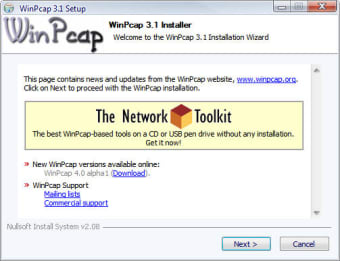
WinPcap is a tool that allows users to transfer packets of information within Windows operating systems by circumventing the protocol stack. This allows data to be processed more efficiently. Such a tool is often used by website developers, networking testing professionals and open-source software creators. It is designed to be used with personal computers.

Top Recommended Alternative

Core Features and Tools

WinPcap can be thought of as a virtual 'bridge' over traditional Windows protocol techniques. It bypasses these methods and enables packets of data to be sent to another area within a hard drive more efficiently. This software is comprised of a driver and a built-in library. The driver provides the user with access to low-level networks and the library interacts with different network layers. It should also be mentioned that the Unix API is found within this library. The ultimate goal of this bundle is to enhance end-user efficiency when interacting with a network.

Additional Accessories

Some other tools included within WinPcap include Wireshark data management control and the ability to work with 802.11 a/b/g/n networks. Please note that it is also possible to purchase a separate USB card along with the original software if desired. The most recent updates of this system seem to have occurred in 2013.


  • Pros

    • An excellent way to expedite the transmission of packet data between two nodes.

    • A useful analytical tool in regards to network testing.
  • Cons

    • The user will need to possess a fair amount of technical knowledge.
    • No updates have taken place for some time.
 0/1

App specs

  • License

    Free

  • Version

    4.1.2

  • Latest update

  • Platform

    Windows

  • OS

    Windows 2000

  • Language

    English

  • Downloads

    65.1K

    Last month's downloads

    • 59
  • Size

    915.92 KB

  • Developer

Program available in other languages


Icon of program: WinPcap

WinPcap for PC

  • Free
  • 3.6
    112
  • 65.1K
  • V4.1.2

User reviews about WinPcap

3.6

1 reviews

Add review

Main reviews for you

  • Anonymous user

    I think WinPcap is the only software program tool capable of providing all the features that I am looking for a virtual bridge of all my Windows operating system. Of all the other virtual brige tool that I've experienced only WinPcap has the capability to provide super efficient data processing.

More

You may also like

Alternatives to WinPcap

Explore Apps

Latest articles

Laws concerning the use of this software vary from country to country. We do not encourage or condone the use of this program if it is in violation of these laws.
Softonic

Is WinPcap safe?

100/100

Score result: Clean

This file passed a comprehensive security scan using VirusTotal technology. It is safe to download.

  • Virus free
  • Spyware free
  • Malware free
  • Verified by Security Partners

    VirusTotal logo

Scan Info

Last scan
Friday, December 8, 2023
Scan provider
VirusTotal · Full report

File Integrity

File
WinPcap_4_1_2.exe
SHA256
6dd1fd832de94c4b374b25f44f6bf8fb0af034fe6768bd58d79b439b55d09993
SHA1
5bbdce5c2ad5423ba023b1272301a7fb49279b16

Softonic security commitment

WinPcap has been thoroughly scanned by our advanced security systems and verified by industry-leading partners. This file comes from the official developer and has passed all our security checks, showing no signs of viruses, malware, or spyware. For more information, visit our Security and Trust Center